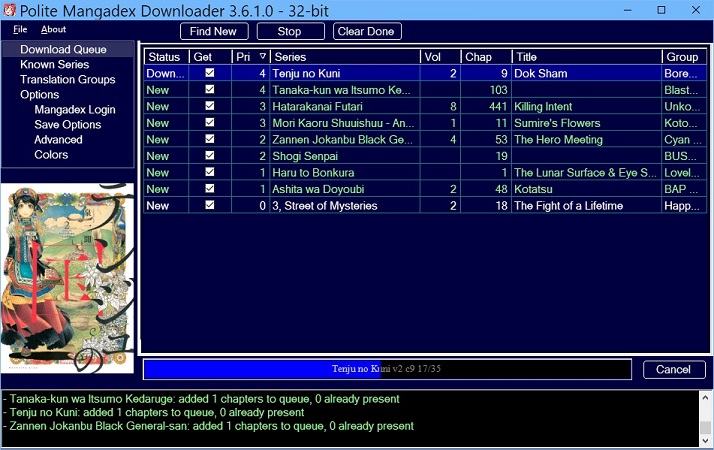
Aug 29 2026 - Version 7.4.2
MD has really messed things up with their new flood of fake 'chapters' from official publishers today. They changed how these fake chapters are represented in the JSON payloads, which gets around my fake groups check and can even cause a hang because there's null data far earlier than expected. New Fake detection logic, takes two chapters to mark a group as Fake and Ignore it.
And then a bunch of other fixes. I swear, no more new features to break things for a while - but half the fixes are for things that changed under me.
Jul 15 2026 - Version 7.2
7.2.0 has two big changes - first, if you're on 7.x at all you want 7.2.0 because 7.x would sometimes not automatically download the old chapters of new favorite series even if you asked it to. This is the first big bug I've found in the 7.x rewrite.
Second, because my old side monitor actually got burn-in from having PMDL sit there 24/7, I've added random window jiggle to 7.2. Whenever you move the window that sets the 'home' location. Then when you start PMDL or a scheduled check starts it slightly moves the window randomly up/down/left/right so the white lines aren't always in the same place. Since the new location is relative to your home location, it doesn't just walk across the screen. It does nothing if the window is minimized or maximized and it won't bring it to the front if it's behind other windows. You can turn this off in Options -> Advanced.
Jun 23 2026 - Version 7.x
Mangadex updated to new certs which use YE and YR roots that older Windows boxes don't know anything about (and never will). It also needs newer crypt and Win10's TLS 1.3 is broken. Windows 10 and earlier are never going to support this. Your browser works fine on Win10 because your browser handles all of this itself!
So PMDL 7.x fixes it by (like your browser) doing all SSL and web traffic itself using libCurl.
If you upgrade from 6.x (or earlier), uninstall the 6.x one first or 7.x will fail on startup because libCurl can't unpack its libraries to an admin directory. You won't lose your database or settings!
Version 7.4.3 - 2026 Sep 03 10:59 PST
Fix: If NOT limiting cover size, covers would not get saved.
Version 7.4.2 - 2026 Aug 30 18:12 PST
Fix: MD really broke how it represents fake chapters for fake groups with this new
flood of licensed stuff. Messed up my fake detection and returned null data
earlier than expected, so could cause soft lockup on download.
Change: To go with above, if a group has two chapters in a row with fake hashes
we ban them. You will see two chapters of errors then 'marking fake and
ignoring'. You can always mark them as 'Fake' and 'Ignore' in 'Translation Groups'.
Fix: libCurl race condition could stop new version download/install from working.
Would show up as 'The specified executable is not a valid application'.
Fix: Spurious 'Ignored Group' messages when new group was not actually ignored.
Fix: Groups not showing up in Chapters window, related to the previous.
Fix: 'Cannot clear this list' error in Recheck Chapters.
Fix: Copy log to clipboard fail due to new STA thread from 7.4.0. Just pre-copy.
Fix: Deleting covers broke some time ago because .NET SQLite API for BLOBs changed.
Fix: That also broke check Recheck Series Cover Image in many cases.
Version 7.4.0 - 2026 Aug 15 10:45 PST
Fix: Entering a ' (single quote) into any of the search boxes would crash.
Fix: In Known Series, if you had a filter ('sdfsa') that showed no results and turned
on showing unfavorites and oneshots, it would crash.
Fix: Crash form crashing (doh) with .NET 10 if you hit the 'copy log to clipboard' button.
Fix: Ancient crash (from 1.0?) if you deleted a chapter while downloading it.
Change: Move DL Queue and Chapters to the new faster architecture the Series/Author/Group
went to in 7.1.0. Drag and drop no longer works in DL Queue. If you want to DL something faster just raise its priority with = (+).
Change: Re-Sort button and right click item removed because DLQueue can no longer be unsorted.
Version 7.3.0 - 2026 Jul 26 07:57 PST
Fix: Big memory leak with libCurl, smaller one with ZetaLongPaths
New: Don't pre-load series, groups, or authors unless you switch to the tab.
More memory savings, much faster startup!
New: Make covers optional for oneshots. This will cut your database size a
bunch if you read a lot of them. Options -> Including Oneshot Covers.
New: Purge old H or Oneshot covers at shutdown if you said don't save them.
Fix: Catch errors on update check/download - whine but don't crash.
New: Make favorited oneshots a different color on series page.
Fix: Tiny text change for recheck series description.
Version 7.2.0 - 2026 Jul 15 16:23 PST
Fix: Sometimes did not get old chapters of new series! First big bug of 7.x redo.
New: Random up/down/left/right movement to main window on startup and scheduled
check to help reduce monitor burn-in. Options -> Advanced -> Window Move
Fix: When double clicking a chapter in the DL Queue to go to series in Known Series,
make sure series is visible by clearing the filter box and checking show oneshots
and unfavorites boxes if needed, or we could select an invisible row.
Change: Old version info in this README.txt was over a thousand lines and almost
nobody cares about v1.0.5 any more. Moved it out to 'Old Version Info.txt'
Version 7.1.2 - 2026 Jun 25 18:34 PST
New: Whine at startup about running out of a location libCurl can't write
to before libCurl crashes us anyhow.
New: Try showing a bit more error info (InnerException) on crash.
Change: Redo rounded button rendering. You shouldn't see any difference.
Fix: Visual Studio or JetBrains somehow lost the program icon, restore it.
Version 7.1.0 - 2026 Jul 09 14:09 PST
Meta: This is a HUGE optimization and cleanup release. There are some minor bug fixes, but nothing vital if it's working fine for you. Check the README.txt for the full list of changes.
Change: Vastly speed up (over 100x) Known Series, Translation Groups, and Artists pages by redoing how they're stored.
New: Take over drawing of DataGridView headers so cells and headers are now properly aligned.
New: We now notice oneshots, optionally filter from Known Series. On the first startup it will guess existing, from then on get from MD.
Fix: Add vertical padding to log box lines so descenders (g,q) don't get cut off.
Fix: Lots of little text/position things on Options pages.
Version 7.0.3 - 2026 Jun 25 21:29 PST
Fix: Delegate race condition with libCurl could cause rare ExecutionEngineException (then crash).
Version 7.0.2 - 2026 Jun 25 20:45 PST
New: Catppuccin Color Theme from Rhombic-Drive!
Fix: Wine doesn't support Per-monitor DPI, crashes on menus.
Detect Wine and turn it off.
Fix: Theme Import broke because of Sqlite changes. Fixed.
Fix: Download Update file was mildly broken with new Curl stuff.
Version 7.0.1 - 2026 Jun 23 21:12 PST
Fix:The output log was getting color themed, should always be black background.
Fix:Apparently the color pickers in themes haven't worked for years and nobody noticed or cared!
Version 7.0.0 - 2026 Jun 23 00:44 PST
MAJOR rewrite of the guts to handle MD's new cert stuff not being handled by older Windows.
YOU do NOT need to update if 6.6.5 is working fine for you.
You might want to make a copy of your mangadex.db file first just in case.
If you update, you MUST uninstall your 6.x PMDL first. Otherwise it will just
fail on start as libCurl tries to unpack its files and fails because it doesn't have
admin rights. It's okay if you uninstall after, then install again.
Version 6.6.5 - 2024 Nov 17 20:09 PST
Plain username/pw login is DEAD. You also need an API key. See Options -> Mangadex Login.